


1. Click this link: Sign up for bluehost hosting
2. Click the green button “Get Started Now”
3. Under the “Starter” plan ($3.79/mo), click the blue button “Select” / “Choose Plan”.
4. If you already own a domain URL, click the checkbox “I want to use a domain I already own” and type in your domain URL and click “Use This Domain Name”. Otherwise, click “Choose domain later”
5. Enter your email address and password.
6. Uncheck all of the “Recommended Add-ons” except for “Starter Hosting”.
7. Enter your credit card information.
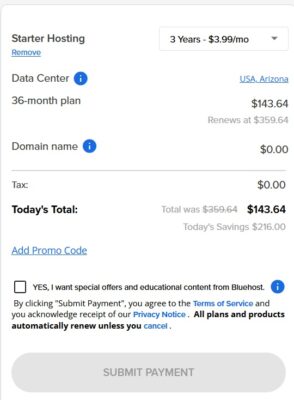
8. Choose either 1 year, 3 years, or 4 years from the dropdown. I recommend locking in $3.79/month for rate for 3 or 4 years, it’s a great price and you can use this same server to host additional websites on this server in the future if you need to.
9. In the shopping cart section, click “Remove” next to each section so you can remove everything besides the “Starter hosting”. Remove the “Domain Privacy + Protection”, remove the “Professional Email Trial”, and anything else like that. After removing all the extras, your shopping cart should look similar to the screenshot below:
10. Click “Submit Payment” to finalize the order.
11. You will receive an email from bluehost, please forward this email to dan@swssupport.com, and in the email please also include the password you created for bluehost.